

How to Modify Xbox 360: The Complete Beginner’s Guide
The Xbox 360 defined an entire era of gaming, but straight out of the box, it operates inside a walled garden. Microsoft designed the console to run only verified game discs, connect strictly to official servers, and store files exclusively on proprietary hard drives. Learning how to modify Xbox 360 hardware unlocks its full potential: custom game launchers, temperature controls to eliminate the dreaded Red Ring of Death (RROD), region-free gaming, homebrew emulators, and running your physical game backups directly from an affordable USB hard drive.
Modifying a console might sound like dark magic reserved for computer science majors, but modern techniques make it far more accessible than it was a decade ago. Here is a grounded, step-by-step walkthrough detailing how the modern Xbox 360 modding scene works, what tools you need, and how to choose the right mod for your system.
Why Modify an Xbox 360 Today?
With the official Xbox 360 digital marketplace closed, game preservation rests largely in the hands of players. When you learn how to modify Xbox 360 systems, you transform an aging piece of plastic into an open multimedia and retro gaming powerhouse.
Here are the primary perks:
- Custom Dashboards (Aurora & Freestyle): Replace the cluttered, ad-heavy stock dashboard with sleek, customizable interfaces that automatically download game cover art, title updates, and game synopses.
- Disc Drive Preservation: The laser optics in DVD drives degrade over time. A modified system allows you to rip your owned game discs straight to an internal or external USB hard drive, loading games faster and saving wear and tear on mechanical parts.
- Active Cooling Management: Overheating killed millions of early Xbox 360 units. Custom firmware lets you adjust fan speed curves to keep the CPU and GPU running significantly cooler.
- Retro Emulation: Run retro engines like RetroArch to play original Xbox titles, PS1 games, Super Nintendo, Sega Genesis, and classic arcade ROMs seamlessly.
- Unrestricted Storage: Use standard 2.5-inch SATA hard drives or external USB storage drives up to 2TB without buying overpriced official proprietary drives.
Step 1: Identify Your Xbox 360 Motherboard
Before buying tools or stripping screws, you must know what motherboard revision sits inside your console. Not every Xbox 360 can be modified the same way, and one specific revision cannot be hardware-modded at all.
| Console Model | Typical Motherboard | Power Rating on Rear Label | Modding Verdict |
|---|---|---|---|
| Xbox 360 “Phat” (White / Black Elite) | Falcon / Jasper | 12V — 14.2A (Falcon) or 12.1A (Jasper) | Supported (RGH 1.2 recommended, RGH3 possible) |
| Xbox 360 Slim (Glossy / Matte Black) | Trinity | 12V — 10.83A | Best Candidate (RGH 3 works flawlessly) |
| Xbox 360 Slim / Early E | Corona (V1–V6) | 12V — 9.6A | Supported (May need Postfix adapter for V3–V6) |
| Xbox 360 E (Late 2014–2015) | Winchester | 12V — 9.6A (MFR Date after Aug 2014) | Unmoddable via Hardware (CPU traces removed) |
Critical Warning: If you have an Xbox 360 E manufactured from August 2014 onward, check the motherboard carefully. Microsoft redesigned the CPU package on the Winchester board, eliminating the POST traces required for hardware glitching. Attempting to solder an RGH mod to a Winchester will ruin the board.
Step 2: Choose Your Modding Method
When exploring how to modify Xbox 360 consoles, there are three primary paths available:
1. RGH 3.0 (Reset Glitch Hack 3.0) — The Gold Standard
For years, modding an Xbox 360 required soldering a bulky third-party “glitch chip” (like a CoolRunner or Matrix Glitcher) inside the console. RGH 3.0 changed everything. It uses the console’s own internal Southbridge and processor lines to time the glitch attack.
- Cost: Extremely low (under $10 for parts).
- Hardware needed: Two thin wires, one resistor (and a diode for Phat consoles), and a USB NAND programmer.
- Result: Near-instant boot times and full unsigned code execution.
2. The “BadUpdate / Peer Pressure” Softmod
Historically, the Xbox 360 had zero purely software-based hacks that persisted across reboots. However, security researchers discovered exploits leveraging demo containers and font-handling flaws (such as BadUpdate and Peer Pressure).
- Pros: Requires no soldering iron to execute initial homebrew payloads.
- Cons: Often “tethered” or requires loading through a specific game demo/profile each boot cycle unless bridged into a permanent NAND flash.
3. Flashed Optical Drive (LT+ 3.0)
This older method involves connecting the console’s DVD disc drive to a PC via SATA and flashing custom firmware (iXtreme LT+) onto the drive controller.
- Limitation: It only lets you play burned backup DVD discs. It does not let you install emulators, bypass region locks, or run games off a hard drive. For most modern tinkerers, RGH 3.0 is vastly superior.
Essential Tools and Materials
If you opt for the permanent and versatile RGH 3.0 route, gather the following gear before opening your console:
- Opening Tools: Torx T8 and T10 screwdrivers, a plastic spudger or Xbox 360 case-unlocking tool, and an X-clamp removal tool (a small flathead screwdriver works with care).
- Soldering Gear: A temperature-controlled soldering iron with a fine needle tip, high-quality 60/40 or lead-free rosin core solder, and tacky rosin flux (flux is essential—never solder dry).
- Wiring & Components:
- 30 AWG Kynar (wire-wrap) wire.
- For Trinity boards: One 3kΩ to 10kΩ resistor (3.3kΩ is ideal).
- For Corona boards: One 1kΩ resistor (and a Corona Postfix Adapter if your board lacks internal POST traces).
- For Phat (Jasper/Falcon) boards: One 22kΩ resistor and one 1N4148 switching diode.
- NAND Programmer: A Raspberry Pi Pico running the free PicoFlasher firmware, or a dedicated xFlasher/NAND-X.
- PC Software: J-Runner with Extras (Windows application for reading and flashing Xbox 360 NAND chips).
Step-by-Step Walkthrough: Modifying an Xbox 360 (RGH 3.0)
Modifying the console requires patience, a steady hand, and careful attention to detail. Do not rush any step.
+-------------------------------------------------------------+
|                     RGH 3.0 OVERVIEW                        |
|                                                             |
|   1. Read NAND   -->   2. Solder 2 Wires  -->  3. Boot XeLL |
|   (Backup Stock)         (PLL & POST)          (Get CPU Key)|
|                               |                             |
|                               v                             |
|   5. Enjoy Aurora <--  4. Write Custom                      |
|      Dashboard            XeBuild Image                     |
+-------------------------------------------------------------+
1. Disassembly and Preparation
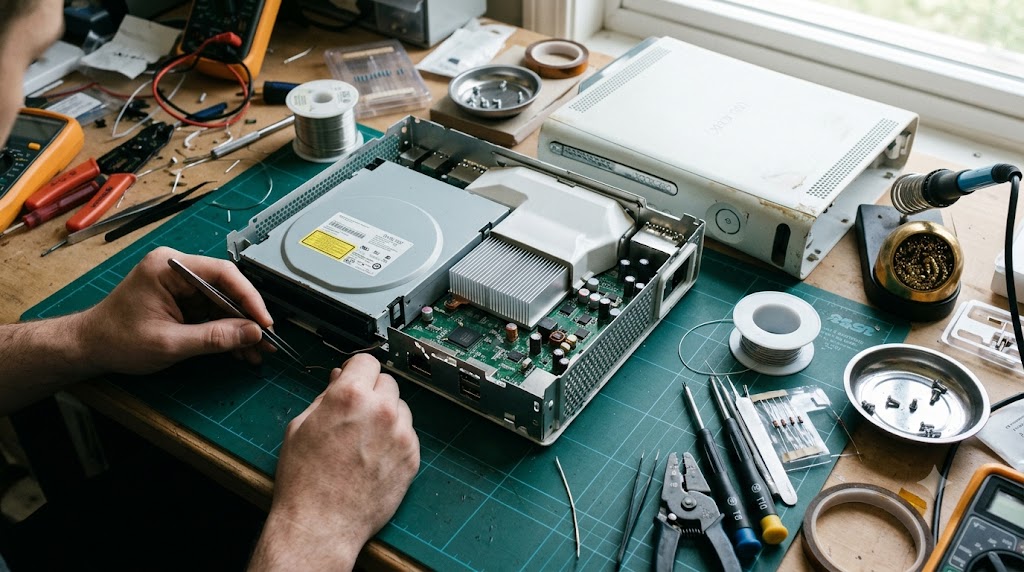
Carefully unclip the outer shell of your Xbox 360. Remove the Torx screws securing the metal RF shield, unplug the front power ribbon cable, and extract the motherboard. Clean off any dust with a soft brush and isopropyl alcohol (90%+).
2. Wire the NAND Flasher
Before making any permanent hardware modifications, you must back up your console’s operating system (NAND).
- Solder your programmer wires (from your Raspberry Pi Pico running PicoFlasher) to the designated J2C1 / J2C3 header pads on the underside of the Xbox motherboard.
- Plug the Xbox power supply into the wall and connect it to the console (leave the console turned off—standby power supplies electricity to the NAND chip).
- Connect the Pico to your PC via USB and open J-Runner with Extras.
- Click Read NAND twice. J-Runner will dump two identical 16MB or 48MB copies and compare them. Ensure the log confirms: “NANDs are identical.” Save these backups in multiple safe folders. If anything ever goes wrong, this file can unbrick your console.
3. Solder the RGH 3.0 Points
Disconnect the programmer and power brick. Now install the two core wires that execute the glitch:
- The POST Line: Solder a wire to the designated POST test point underneath the CPU. (If working on a Corona V3–V6, insert the Corona Postfix adapter under the corner of the APU to tap the hidden trace).
- The PLL Line: Carefully scrape away the green solder mask on the tiny CPU PLL bypass via using a fiberglass scratch pen or hobby knife until bright copper shows. Add flux, tin the point with a micro-drop of solder, and attach your wire with the inline resistor.
- Route both wires cleanly around the board components using Kapton tape to shield them from electrical noise.
4. Flash XeLL and Retrieve Your CPU Key
- In J-Runner, select Glitch2 and check the RGH3 box.
- Click Create XeLL and then Write XeLL.
- Disconnect your flasher, hook up an HDMI cable and Ethernet cable, and power on the console.
- Within seconds, your console should boot into a blue screen called XeLL Reloaded (Xenon Linux Loader). XeLL displays your console’s unique CPU Key. Take a clear photo or type it directly into J-Runner.
5. Build and Write the Modified XeBuild NAND
With the CPU Key entered, J-Runner can decrypt and rebuild your original system software:
- Click Create XeBuild Image. J-Runner patches the kernel to accept unsigned code.
- Reconnect your programmer and click Write NAND.
- Once completed, desolder your flasher wires, clean the pads with isopropyl alcohol, and reassemble the console.
Setting Up Your Software: DashLaunch and Aurora
Once the console boots into standard retail dashboard mode with your RGH mod active, it is time to install homebrew software.
- Format a USB Drive: Format a flash drive to FAT32 (using FAT32 Format / GUIFormat on Windows).
- Install XeXMenu: Download XeXMenu 1.2 and place it in a folder named
Content/0000000000000000/CODE9999/00080000/. Plug it into the 360, navigate to the stock system’s Game Library, and launch XeXMenu. This functions as your basic file explorer. - Install DashLaunch: Run the DashLaunch installer from XeXMenu. DashLaunch applies low-level system patches, prevents accidental system updates from wiping your mod, and blocks connections to official Xbox Live servers to keep your console unbanned.
- Install Aurora Dashboard: Copy the latest Aurora dashboard folder onto your internal hard drive (
Hdd1:\Aurora\Aurora.xex). In DashLaunch, setDefaultboot path toHdd1:\Aurora\Aurora.xex. - Reboot your system. Your Xbox 360 will now boot directly into the modern Aurora dashboard, showing system temperatures, fan curves, and a cover-art browser.
Crucial Safety and Maintenance Guidelines
- Stay Off Standard Xbox Live: Connecting a modified console directly to official Xbox Live servers triggers an immediate permanent console ban. If you wish to play online, look into community stealth servers (such as Proto, Tethered Live, or Shield) designed to mask modified kernel calls.
- Never Lose Your Stock NAND Dump: Store your original
nanddump.binandcpukey.txtin cloud storage and an external drive. If a future flash ever fails, your console can always be revived if you have these two files. - Repaste the Heatsinks: While your console is disassembled, clean off the 15-year-old, dried-out thermal paste from the CPU and GPU. Apply a fresh pea-sized drop of quality paste (such as Arctic MX-4 or Noctua NT-H1). This single maintenance step drops operating temperatures by 10°C to 15°C, ensuring your newly modified system lasts for years to come.
Modifying your Xbox 360 requires careful preparation and steady soldering, but the reward is complete ownership over classic hardware. From preserving your disc library to exploring community homebrew and system themes, an unlocked 360 remains one of the most rewarding retro console projects in gaming.